0 minutes
Written by
Diana Mamani
Published on
January 5, 2026
Published on
January 5, 2026
Modified on
January 12, 2026
Go Back

At 6:45 a.m., the parking lot is full, drivers are on the clock, and there’s a line at the key cabinet. One dispatcher is handing out keys, answering questions, and trying to keep routes on schedule. Ten minutes later, the first trucks finally roll out.
That lineup doesn’t just feel slow; it shows up in late departures, overtime, and lost delivery windows. This article breaks down why morning key lines happen and how a smart key management system can remove them without adding new work for your team.
For a fleet manager, that 10–20 minute wait each morning has real impact:
Lost or misplaced keys quietly drain time, money, and productivity, and those losses are magnified when they happen at the start of every shift.
Morning key lineups are a symptom of a deeper issue: your access process is built around people being physically present at the same time, instead of around a system that works on its own.
Most morning delays come from a mix of old habits and manual tools. When thinking about improving key access for fleets, there are several common problems that show up in real fleets:
When everything depends on one person and one physical place, you almost guarantee a lineup at the moment everyone needs something at once.
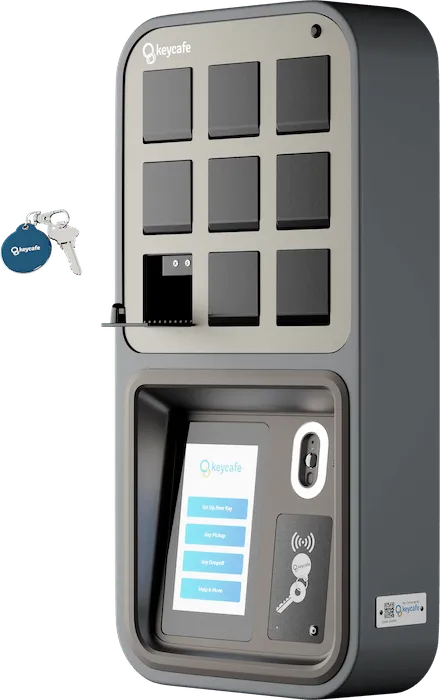
A modern key management system like Keycafe replaces “line up at the desk” with self-serve, authenticated access. Here’s what changes.
Drivers access keys using a unique PIN, QR code, mobile app, or existing NFC badge, with the option for two-factor authentication for higher-security fleets.
No more shared cabinet codes or waiting for a dispatcher with a key. Each driver proves who they are, and the system checks their permissions automatically.
Keys are stored in individual locked bins inside the SmartBox. Once a driver is authenticated and a key is selected, only the designated bin pops open, and the system logs:
This cuts down on “grabbed the wrong van” errors that cause last-minute scrambles at the yard.
All pickups and returns are stored in a cloud-based audit trail that managers can review from web or mobile apps. You see exactly who took which vehicle and when, across all depots.
For multi-site fleets, a single dashboard shows key status at each location instead of scattered spreadsheets or local cabinets.
When using Keycafe in a distributed fleet, keys returned to the locker are instantly visible as available for the next shift, simplifying shift changes across locations.
Instead of passing keys hand-to-hand, the outgoing driver returns them to the SmartBox at the end of their day. The morning driver simply authenticates and picks up from the same unit (no overlap or in-person handoff needed).
With offline key exchange and battery backup, the SmartBox can continue to grant access during internet or power outages, then sync transactions when the connection returns.
That means your first shift still gets keys at 5:30 a.m. even if the network is down, instead of standing in the dark waiting for IT.
If you’re ready to get rid of the key line, here’s a practical sequence you can follow.
Spend one week watching the first 60 minutes of the day:
Place your SmartBox where drivers naturally arrive: near the parking lot entrance, dispatch office, or yard gate.
Move all fleet keys into the SmartBox and retire ad hoc storage like drawers or guard shacks. For multi-site fleets, use connected cabinets at each yard, all tied into one account.
Configure each driver with their own login method and assign them access only to the vehicles or key groups they should use. Keycafe recommends unique PINs or badges managed centrally for consistent, yet convenient access control across sites.
You can:
Configure access rules so drivers can collect keys a bit before their official start time, without a supervisor present.
Drivers who prefer an early start can grab keys, complete pre-trip checks, and be ready to roll when their shift begins.
Instead of a dispatcher handing out every key, use alerts for the cases that truly need attention:
The goal is simple: the system handles routine mornings; people step in only when something is off.
Once all key handoffs runs through the SmartBox, you can export access logs and see:
For a 40-vehicle regional delivery fleet, the change often looks like this:
Nothing “extra” was added to the process, you simply moved access from a person to an automated system that runs the same way every day.
Morning key lineups shouldn’t be “just part of the job”. They are a sign that your key access process still depends too much on people being in the right place at the right time.
With self-serve key pickup, clear permissions, and automated alerts, you can turn shift change from a daily choke point into a predictable, fast routine that supports the rest of your operation.
Ready to stop the morning key lineup and give drivers direct, trackable access to vehicles at the start of every shift? Book a demo to see how Keycafe’s smart key management system can support your fleet’s shift changes, reduce delays, and get your questions answered.


webp.webp)